For Restaurants, Cafés, Eateries & Cloud Kitchens

Restaurant Billing Software Made Simple

Simple restaurant billing. No unnecessary complexity.

Number billing, a visual POS screen, kitchen order tickets and table QR codes in one system. Set up your menu once, then bill the way your staff find fastest — no expensive POS hardware, no week-long training.

No signup required to try · 10-day free trial · Starting ₹1,999/yr · English, हिंदी & मराठी

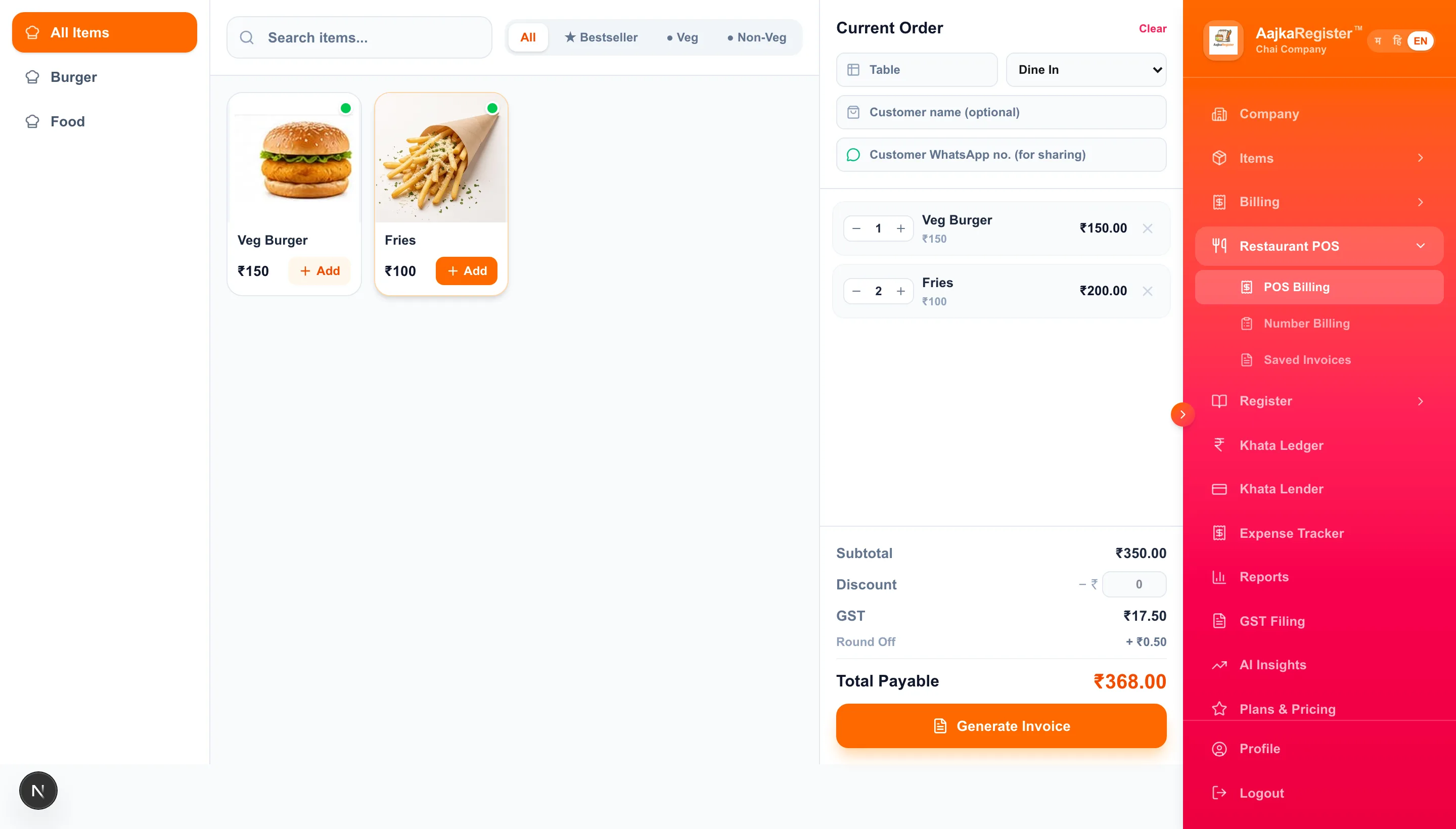
AajkaRegister restaurant POS billing screen
The POS billing screen — tap items, bill printed.
  • Quick billing

    Punch a number or tap an item

  • Easy to use

    New staff learn it in a shift

  • Built for small restaurants

    Not a scaled-down enterprise POS

  • Affordable

    From ₹1,999/yr, no per-bill charge

Feature 01

Number Billing — bill at the speed of a keypad

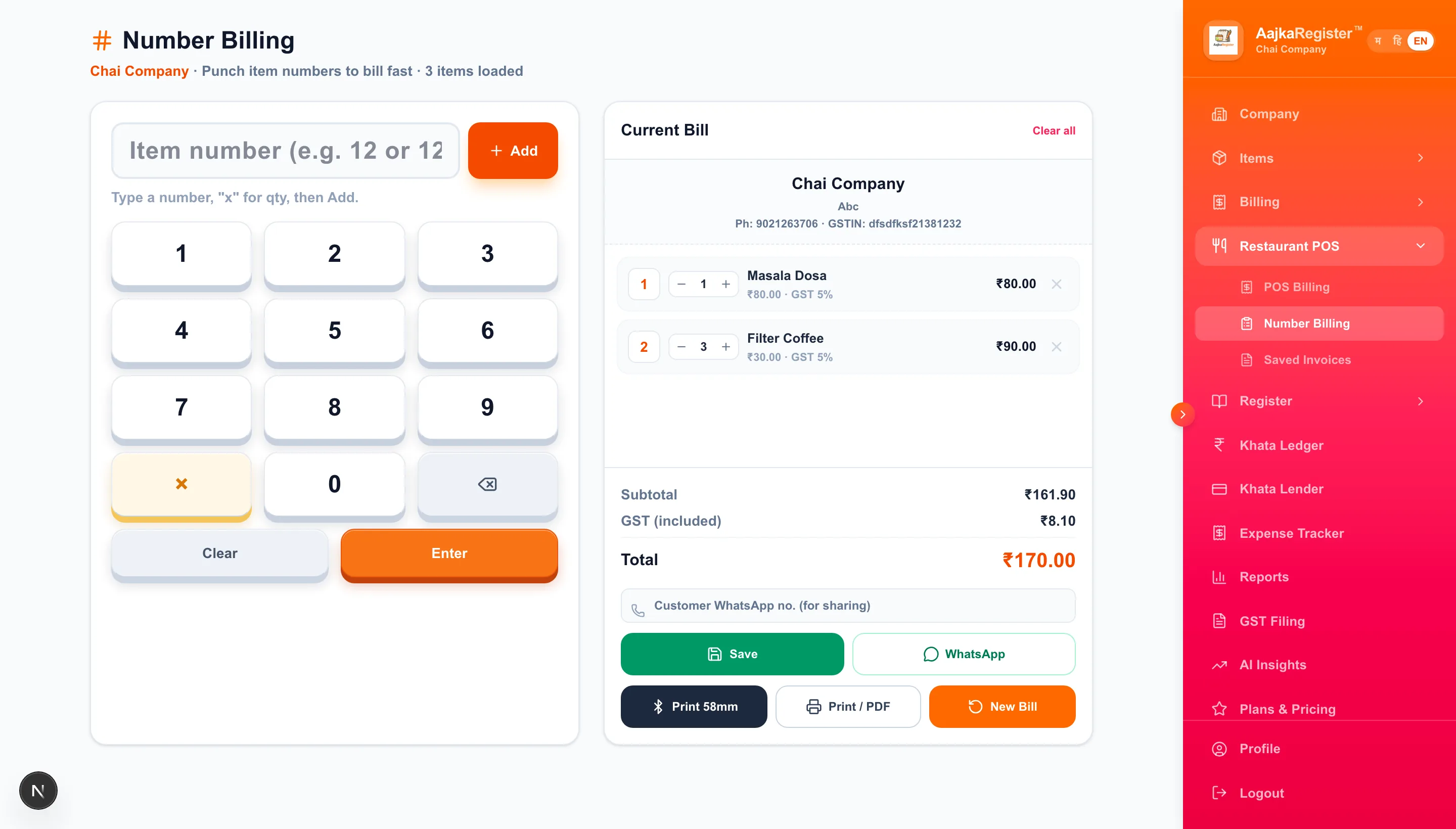
Give every menu item a number. During a rush your counter staff punch the number and the quantity instead of hunting for the dish on a screen. It is the fastest way to build a bill when the same items sell all day, and it is the part of the restaurant billing system your counter will live in.

  • Punch item numbers straight into the bill
  • Minimal tapping — made for busy counters
  • New staff learn it in one shift
  • Ideal where the same menu repeats all day
  • Prints to 58 mm and 80 mm thermal printers
  • GST-ready — every bill can be a proper GST invoice
Try It Free
AajkaRegister restaurant number billing software
Number Billing — punch item numbers to bill fast.

Feature 02

POS Billing — see the menu, tap the order

The POS screen lays your menu out visually, so staff tap what the customer ordered and the bill builds as they go. It suits anyone who would rather recognise a dish than remember its number — and it is the easier of the two to hand to a new hire. It is restaurant POS software — a restaurant point of sale that runs on the phone or tablet you already own.

  • Menu items shown visually for quick selection
  • Simple enough for staff on their first day
  • Quick order entry for dine-in and takeaway
  • Save a bill and reopen it later
  • Suits restaurants, cafés, bakeries and fast-food counters
Try It Free
AajkaRegister restaurant POS billing screen with visual menu items
POS Billing — tap items off your own menu.

Feature 03

Table QR Codes & QR Menu for Restaurants

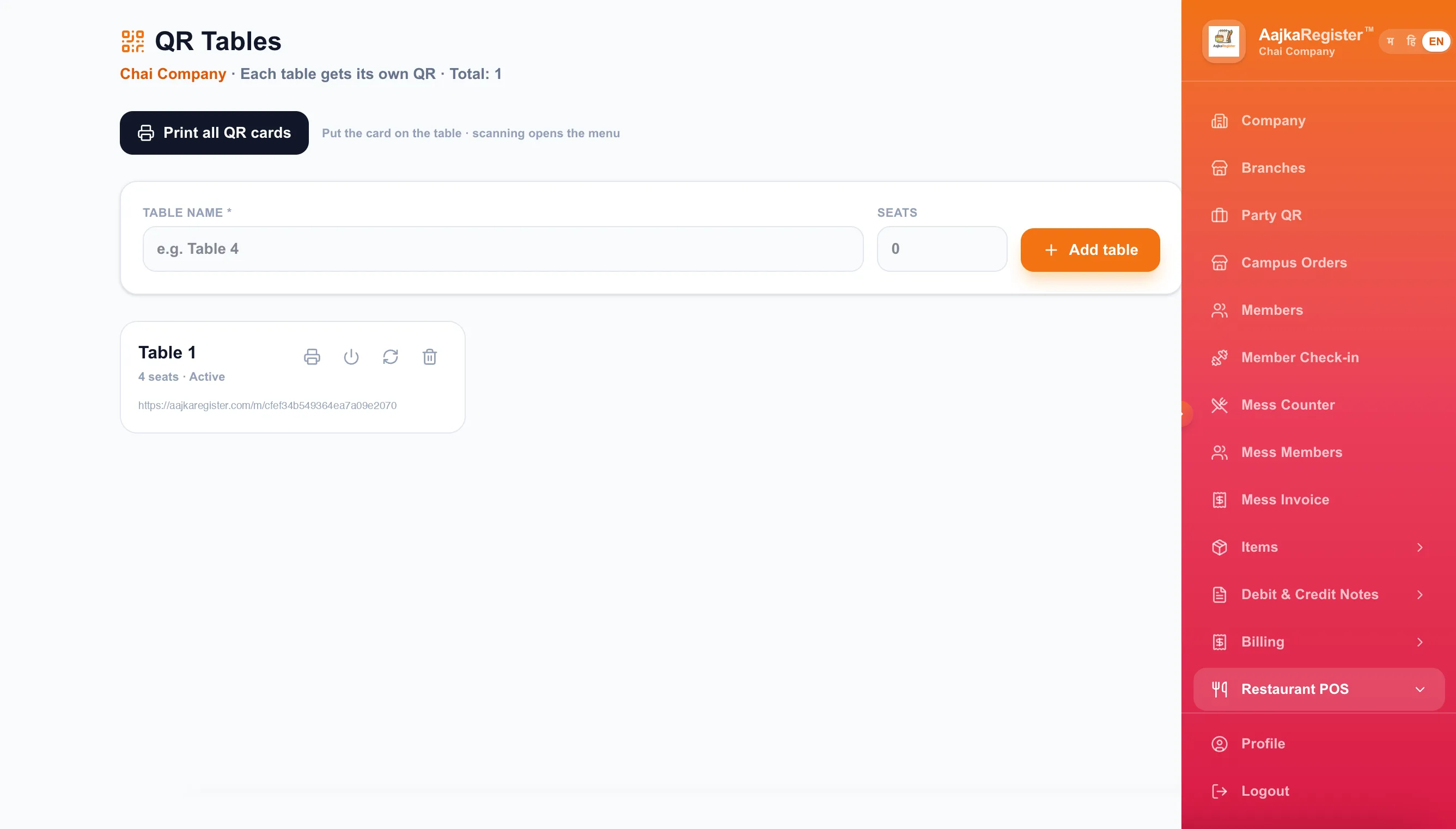
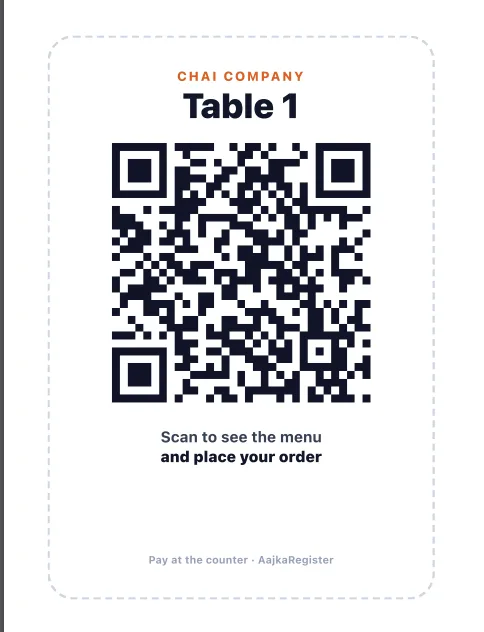
A restaurant QR menu without a new app: create a table in AajKaRegister and it generates a QR card you print and put on that table. A customer scans it to open your menu on their own phone and send their order through to your counter. Payment stays at the counter exactly as it does today.

  • A printable QR card per table
  • Customers open your menu without a printed card
  • Orders arrive at your counter with the table number
  • Menu changes show up instantly — no reprinting
  • A more modern experience without new hardware
Try It Free
AajkaRegister table QR code feature — QR Tables screen
Add a table, and AajKaRegister generates its QR.
AajkaRegister printable table QR card for a restaurant table
The card it prints

Feature 04

KOT — kitchen order ticket software for restaurants

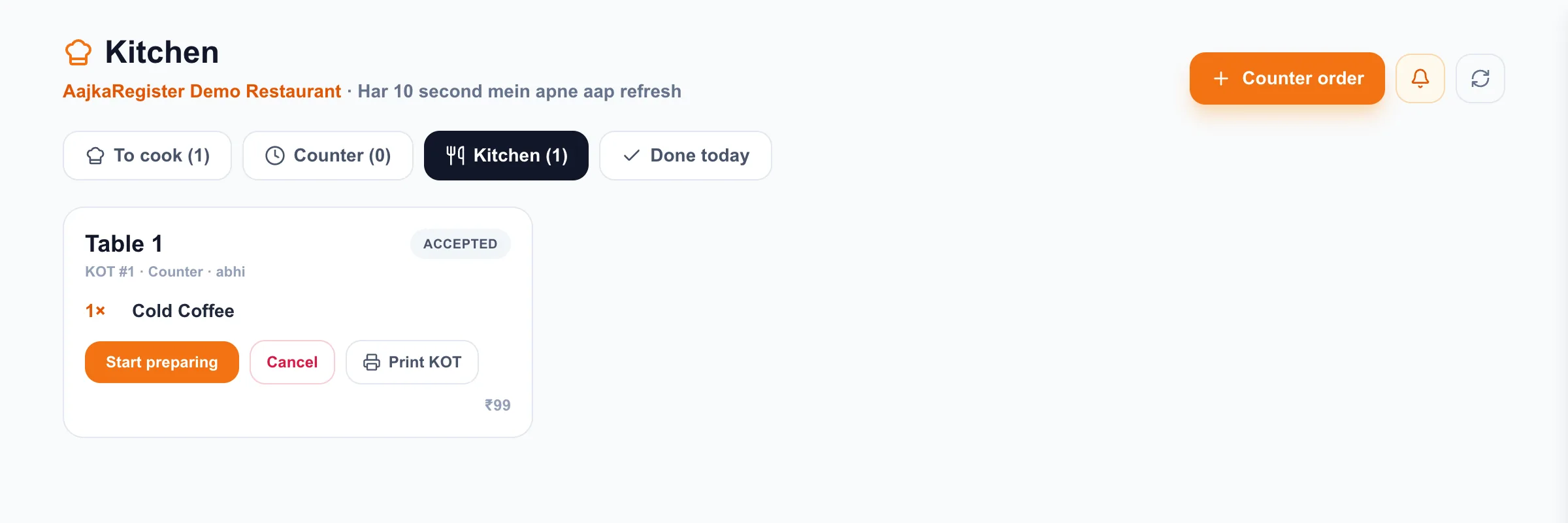
An order taken at the counter, on a waiter's phone or from a table QR scan reaches the kitchen as its own ticket, with a KOT number against the table. The kitchen screen refreshes itself every 10 seconds and chimes when something new lands, so nobody has to shout an order across a busy service.

  • Each order arrives as a numbered kitchen order ticket
  • Tickets sorted across To cook, Counter, Kitchen and Done today
  • Mark a ticket accepted, then ready, then served
  • Print a KOT to a thermal printer when your kitchen wants paper
  • Refreshes every 10 seconds and chimes on a new order
Try It Free
AajkaRegister kitchen order ticket software — KOT screen for restaurants
The Kitchen (KOT) screen — one ticket per order.

More ways to run your restaurant with AajKaRegister

Two more workflows already in the app, for the food businesses they were built for.

AajkaRegister mess billing software

Mess Billing

Mess Billing — for regular, repeat diners

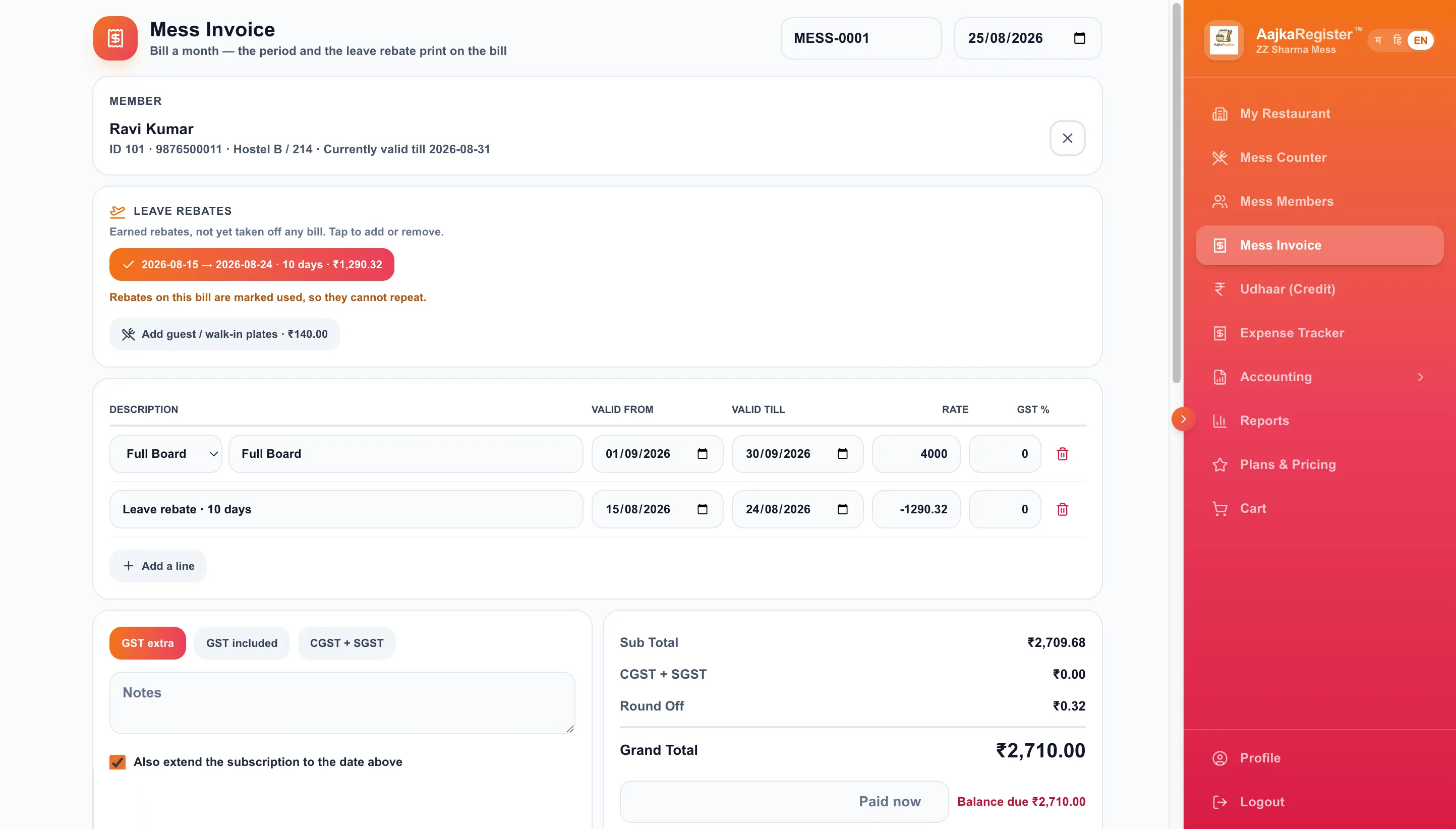
A mess does not bill strangers, it bills the same people every month. Members register once and then just say their number at the counter. Plans, plates, leave and dues are all kept per member, so a monthly bill is a lookup rather than an argument. It doubles as mess management software, or as canteen billing software, wherever the same diners come back every day.

  • Members register once and punch a short ID at the counter
  • The meal is picked by the clock — breakfast, lunch or dinner
  • Monthly plans per member, with guest and walk-in plates charged separately
  • Leave earns a rebate automatically when the days qualify
  • Dues are worked out from plans, plates, rebates and payments — never typed by hand

Part of the Mess module, available on the plans that include it.

Try Mess Billing free
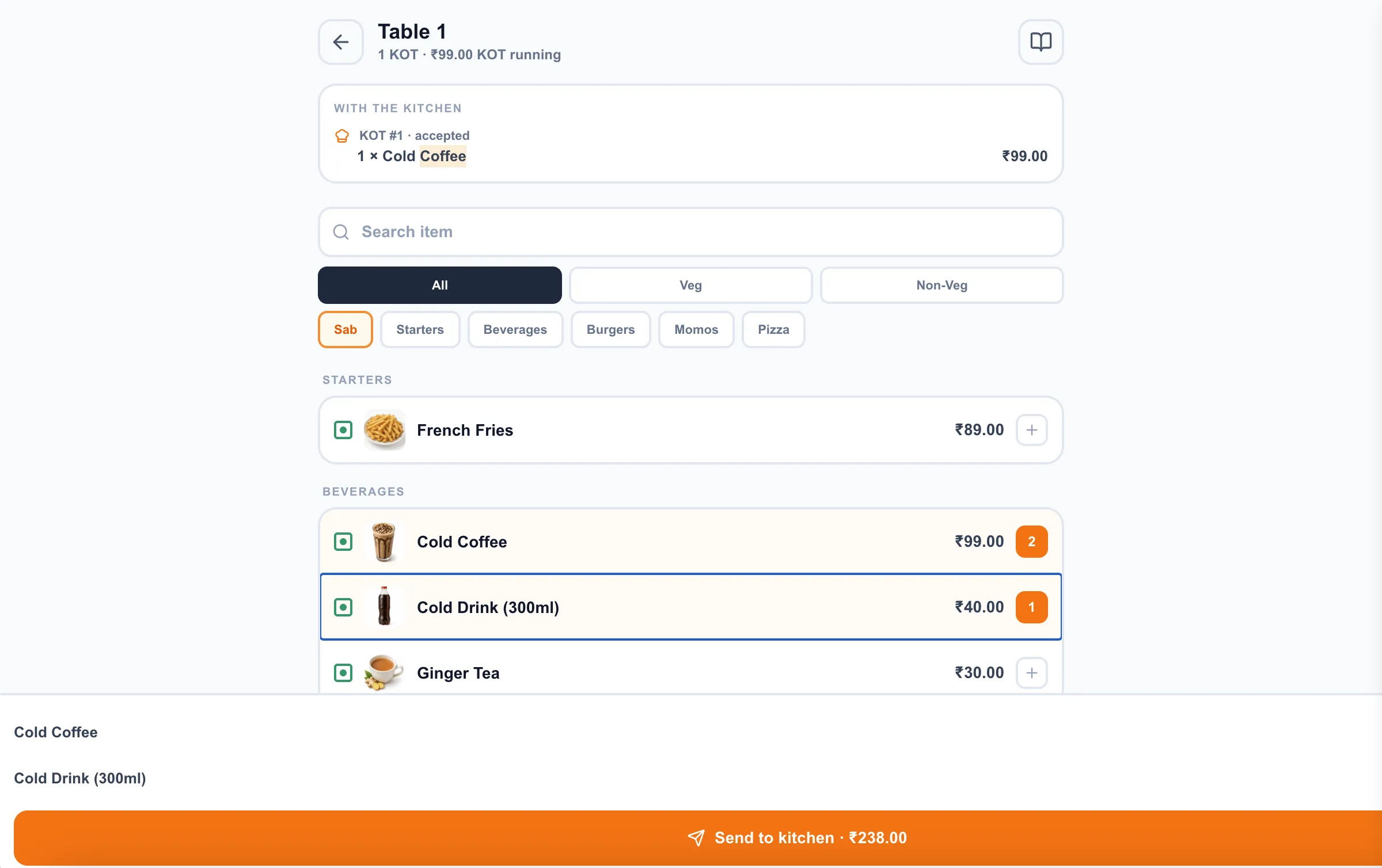
AajkaRegister TableSaathi restaurant table billing on a waiter's phone

TableSaathi Billing

TableSaathi — the waiter's own phone

Your waiter picks a table on their phone, punches the order there at the table, and it reaches the kitchen as a ticket. When the table is finished they settle the bill from the same phone, without walking back to the counter.

  • Order taken at the table, not remembered and re-typed at the counter
  • The order lands on the Kitchen (KOT) screen as a ticket
  • The bill is settled from the same phone
  • A table another waiter is serving is locked, so nobody double-serves it
  • Bills are the same records as counter bills — one Saved Bills list, one number series

A paid add-on plan that also includes Table QR & Kitchen (KOT). See Pricing.

Try TableSaathi

Who it is for

Food businesses that want billing to be simple, not a project — whether you bill walk-ins or the same members every month. The same screens serve as cafe billing software, fast food billing software, bakery billing software or cloud kitchen billing software; only your menu changes.

  • Restaurants

    Dine-in counters and small floors

  • Cafés

    Fast repeat orders over a counter

  • Fast food outlets

    Rush hours, short menus

  • Cloud kitchens

    Billing without a dine-in floor

  • Bakeries

    Counter sales, fixed item lists

  • Small dine-in restaurants

    Owner-run teams

  • Messes

    Monthly members, daily plates

  • Canteens

    The same faces every day

  • Hostel messes

    Students on monthly plans

  • Office meal providers

    Recurring meal accounts

Why AajKaRegister

Most restaurant POS systems are built for chains, then sold to everybody else. A small kitchen pays for that in setup time, training and licence fees.

A heavy enterprise POS

  • Long setup before the first bill
  • More screens and settings than a small kitchen needs
  • Training time you do not have during service
  • Priced for outlets far bigger than yours
  • Often tied to specific hardware

AajKaRegister

  • Add your menu and start billing the same day
  • Two billing screens — pick whichever is faster for you
  • Staff learn it in a shift
  • From ₹1,999/yr with no per-bill charge
  • Works on the phone or laptop you already own
  • Use it in English, Hindi or Marathi
  • Share the bill with the customer on WhatsApp

How it works

Five steps, all of them inside the app.

  1. 1

    Create your account

    Sign up and start the free trial

  2. 2

    Set up your menu

    Add items, prices and item numbers

  3. 3

    Pick your billing screen

    Number Billing or visual POS

  4. 4

    Start making bills

    Print or share the receipt

  5. 5

    Add table QR codes

    Optional — print a QR per table

See the actual screens

Real screenshots from AajKaRegister — not mockups.

AajkaRegister restaurant number billing software
Number Billing
AajkaRegister restaurant POS billing screen
POS Billing
AajkaRegister table QR code feature
Table QR Codes

Restaurant billing software — questions

Straight answers about what the app actually does.

What is restaurant billing software?

Restaurant billing software is the system a restaurant uses to take an order, add the items to a bill and print or share a receipt. In AajKaRegister you set up your menu once, then bill either by punching item numbers or by tapping items on screen, and print to a thermal printer. It doubles as GST billing software for your restaurant, so the same bill can be issued as a GST invoice, and you can share it with the customer on WhatsApp.

Can AajKaRegister be used by small restaurants?

Yes. As billing software for small restaurant counters it is built for small and owner-run food businesses. You can start on a phone, add your menu, and begin billing the same day — there is no on-site installation and no separate POS hardware to buy. Your team can use it in English, Hindi or Marathi, whichever they are comfortable with.

Does AajKaRegister support POS billing?

Yes. As POS billing software for restaurant counters, the POS screen shows your menu items visually, so staff tap the items a customer ordered and the bill builds itself. Saved bills can be reopened later and printed to a 58 mm or 80 mm thermal printer.

What is Number Billing in AajKaRegister?

Number Billing lets you give each menu item a number and then bill by punching that number instead of searching for the item. For a counter serving the same dishes all day it is the fastest way to make a bill, and staff pick it up quickly because it works like a calculator keypad.

Can restaurants use table QR codes?

Yes. You create a table in AajKaRegister, print the QR card it generates and place it on the table. A customer scans it to open your menu on their own phone and send their order to the counter, where you see it come in. Payment still happens at the counter — the QR page does not handle money.

Can cafés and bakeries use AajKaRegister?

Yes. Cafés and bakeries usually sell a fixed list of items over a counter, which suits both Number Billing and the visual POS screen. You choose whichever your staff find faster; both produce the same bill.

What is KOT software?

KOT stands for Kitchen Order Ticket. KOT software turns each order into a numbered ticket for the kitchen, so the kitchen cooks from a printed or on-screen ticket rather than a shouted instruction. In AajKaRegister an order placed at the counter, on a waiter's phone or through a table QR scan reaches the Kitchen screen as its own ticket against that table.

Does AajKaRegister have a KOT screen for the kitchen?

Yes. The Kitchen screen groups tickets under To cook, Counter, Kitchen and Done today, and a ticket moves from accepted to ready to served as the kitchen works through it. The screen refreshes itself every 10 seconds and chimes when a new order arrives, and any ticket can be printed as a KOT on a thermal printer.

Does AajKaRegister support mess billing?

Yes. The Mess module keeps members, monthly plans, plates served, leave and payments per member. Members register once and punch a short ID at the counter, and the meal is chosen by the time of day. Dues are worked out from plans, plates, rebates and payments rather than typed in by hand.

Can AajKaRegister be used by canteens and hostel messes?

Yes. Canteens, hostel messes and office meal providers all bill the same people repeatedly, which is what the Mess module is built for. Guest and walk-in plates are charged on top of a member's monthly plan, and a qualifying stretch of leave earns a rebate automatically.

What is TableSaathi Billing?

TableSaathi is a screen for your waiter's own phone. They pick a table, take the order at the table, and it reaches the kitchen as a ticket. When the table is finished they settle the bill from the same phone instead of walking back to the counter.

How is TableSaathi different from normal POS billing?

POS billing happens at the counter, on the counter's screen. TableSaathi happens at the table, on the waiter's phone, and the order goes to the kitchen first as a ticket. The bill itself is the same record either way — both save through the same billing route, into the same Saved Bills list with the same numbering.

How is TableSaathi different from Table QR codes?

Who does the typing. With a table QR the customer scans, browses your menu on their own phone and sends the order in themselves. With TableSaathi your waiter takes the order on a staff phone. Table QR needs no staff device at the table; TableSaathi keeps a waiter in the conversation and lets them close the bill on the spot.

Is AajKaRegister suitable for fast-food outlets?

Yes. Fast-food counters benefit most from Number Billing during a rush, because a bill can be made with a few key presses and no searching. Cloud kitchens use the same screens to bill orders without a dine-in floor.
Ready to simplify your restaurant billing?

Start the free trial and make your first bill today, or book a call and we will set your menu up with you.

10-day free trial · No card needed to start